在 Chikage 的脚本基础上加了 bbrplus 的内核切换与加速安装
bbrplus项目地址:https://github.com/cx9208/bbrplus
内核更新安装脚本:https://github.com/ylx2016/Linux-NetSpeed/releases
网页地址:https://www.hostloc.com/thread-639936-1-1.html
内核更新安装脚本:https://github.com/ylx2016/Linux-NetSpeed/releases
网页地址:https://www.hostloc.com/thread-639936-1-1.html
在 Vultr 上 Centos 7,Debian 8/9,Ubuntu 16/18 测试通过,不支持 OVZ
(bbrplus 的 Debian / Ubuntu 内核已经弄好了,先加到这里了,我那个原来的项目还没加,毕竟这个很好用)
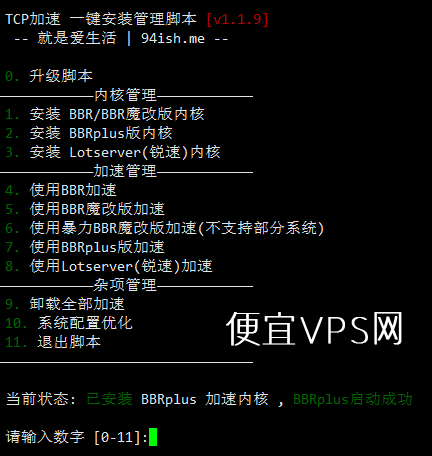
安装:
wget "https://github.com/cx9208/Linux-NetSpeed/raw/master/tcp.sh" && chmod +x tcp.sh && ./tcp.sh
提示证书错误的话:
apt-get -y install ca-certificates
yum -y install ca-certificates
1. 先在 [1 – 3] 切换内核(第一次显示为 bbr 内核也要切换一遍),重启。
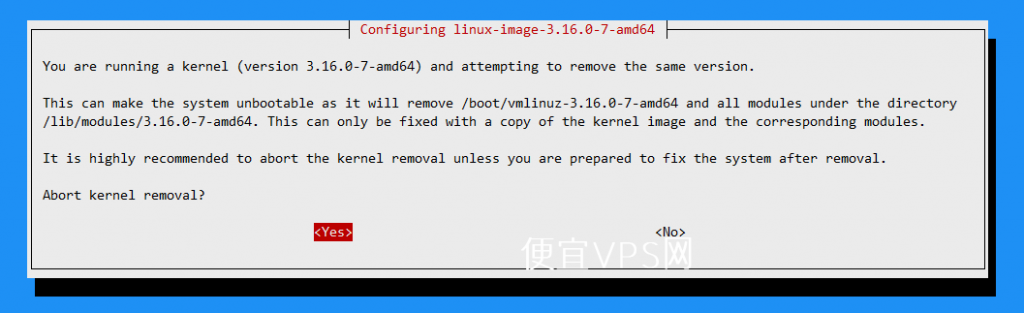
出现这个选 no
2. 重启后不用再下载脚本,直接
./tcp.sh,在 [4 – 8] 中选你要开的加速
“1. 安装 BBR/BBR魔改版内核” 对应 4,5,6(原版,魔改,暴力魔改)
“2. 安装 BBRplus版内核 ” 对应 7(plus)
“3. 安装 Lotserver(锐速)内核” 对应 8(锐速)
“2. 安装 BBRplus版内核 ” 对应 7(plus)
“3. 安装 Lotserver(锐速)内核” 对应 8(锐速)
3. 开启后再
./tcp.sh,显示开启成功则启动成功,你也可以自己手动确认。
----锐速更换内核
wget http://security.debian.org/debian-security/pool/updates/main/l/linux/linux-image-4.9.0-4-amd64_4.9.65-3+deb9u1_amd64.deb
dpkg -i linux-image-4.9.0-4-amd64_4.9.65-3+deb9u1_amd64.deb
dpkg -l|grep linux-image
apt purge
update-grubreboot